AI is smart. But not all that useful. Not yet, anyway.
You ask it to write your cover letter, and it delivers something
Shakespeare would blush at. Ask it to send an actual email? Dead
silence.
That's the paradox of modern AI — all brain, no arms. But a quiet revolution is fixing that. It's called Model Context Protocol, or MCP. And if you haven't heard of it yet, you're about to see it everywhere.
In this guide, lets break down what MCP is, how it works, and why it's becoming the standard for connecting AI models to real-world tools.
The Problem MCP Solves: AI That's Smart But Stranded
Let's start with the truth: AI can generate an essay on 13th-century Mongol warfare in under 10 seconds — but it still can't open your Google Doc and paste it in.
Why? Because while LLMs (Large Language Models) like Chatgpt or Gemini and others are getting smarter, they're still isolated brains. They weren't born knowing how to do stuff in the world — like file transfers, database queries, Slack messaging, or making an API call.
The Fragmented Ecosystem
2023 brought some hope. OpenAI launched function calling, and suddenly, your chatbot could hit an API. That opened doors. Then came LangChain, LlamaIndex, Coze, and others, trying to glue everything together.
But here's the problem - every tool had its own way of connecting. You needed custom code for every integration. Building an AI app felt like managing 37 different USB cables — and none of them were compatible.
That's where MCP steps in — with one cable to rule them all.
What is Model Context Protocol (MCP)?
Model Context Protocol is a unified communication protocol that lets AI agents connect with tools, APIs, data, and even you, the human, in a structured, predictable way.
It was introduced in late 2024 by Anthropic, the AI company behind Claude. Think of it as the Language Server Protocol (LSP) for the AI world — but instead of coding tools, it connects AI to… everything.
From databases to Slack bots, from Blender to your CRM — if there's a digital endpoint, MCP can make your AI talk to it.
MCP Architecture: The Three Musketeers
MCP is built on three components. Together, they form the brain, voice, and hands of your AI assistant.
1. MCP Host – The AI's Home Base
This is where your AI runs. Whether it's Claude Desktop, Cursor IDE, or your own custom agent, the host is where the magic begins. It provides the AI with its environment and loads up the MCP client.
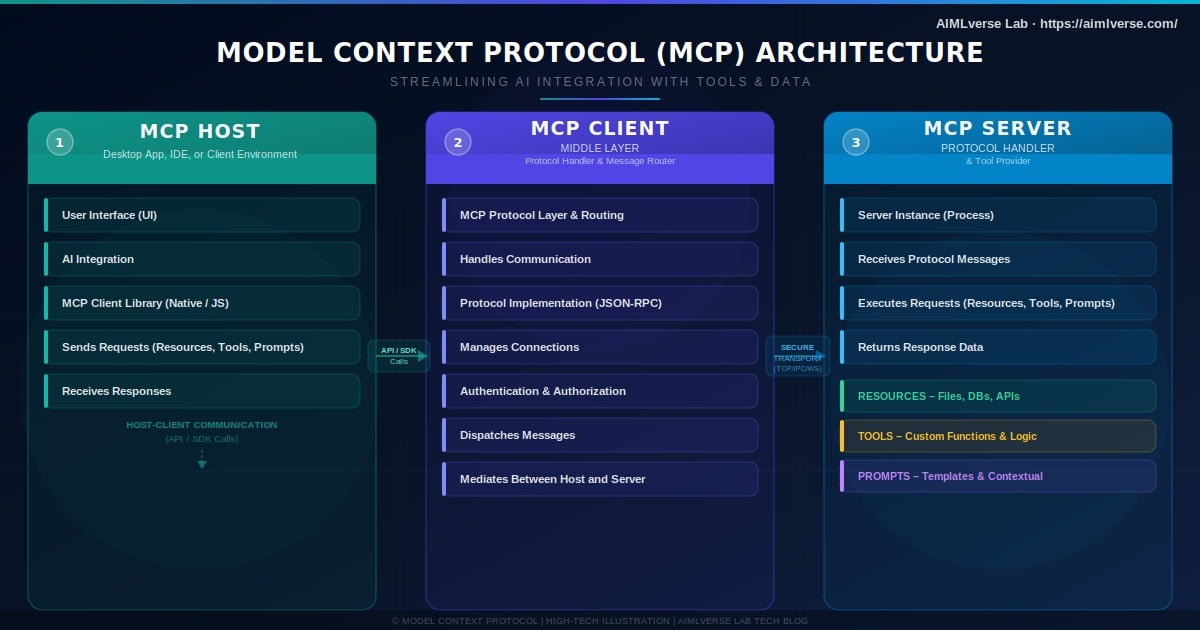
2. MCP Client – The Middleman
This component sits inside the host and acts like the AI's translator, scheduler, and general fixer-upper. It:
- Talks to MCP servers
- Queries available tools
- Manages communication and updates
- Notifies the AI when something happens
- Ensures that the AI doesn't send your birthday card to your tax accountant
3. MCP Server – The Gateway to Everything Else
This is where your actual tools and data live. The server exposes three key things:
- Tools – APIs or actions (e.g., "Send Email", "Post Tweet", "Run Query")
- Resources – Datasets, documents, or even real-time streams
- Prompts – Predefined templates that help standardize how tasks are handled
How MCP Works
Here's how it all flows:
- Initial Request: The MCP client says, "Hey server, what can you do?"
- Server Response: The server replies, "Here's what I've got — tools, data, prompts."
- Ongoing Chat: They keep talking via a transport layer, which ensures real-time updates and smooth execution.
The whole thing runs like an AI orchestra, where the MCP client is the conductor, and the tools are the instruments. Want your AI to summarize a document, create a chart, and send a PDF? With MCP, it can sequence those actions automatically — no babysitting required.
Why Developers (and AIs) Love MCP
Real-World Examples: From Coding to Creative Tools
-
Cursor IDE: An AI-enhanced coding environment where new MCP servers add features like code formatting, Git integration, or test generation.
-
Claude Desktop: AI helps with writing, design, and research — and can pull in tools for data analysis or publishing.
-
Blender via MCP: Connect 3D design tools to prompt-driven modeling agents.
The Challenges Ahead
MCP is still in its early days. A few rough edges:
- Security: Authentication, authorization, and data boundaries need attention.
- Tool Discoverability: How does an AI "browse" for tools safely?
- Remote Deployment: Standardized deployment across clouds and devices is still evolving.
Think of MCP today like the early internet — powerful, but missing some infrastructure.
The Future: AI as OS
Imagine this: every app you use has an AI layer that installs new capabilities as easily as plugins.
Want AI to book meetings? Install the "Calendar Tool" server.
Need help debugging? Load the "Stack Overflow Agent."
Designing a landing page? Combine a prompt server, design toolkit, and CMS export tool.
With MCP, we're not just building AI tools — we're building AI ecosystems.
Ready to Integrate MCP Into Your Business?
For AI consultancy and deployment in your business, our IIT & IIM architects are ready to help you build lean, production-grade AI systems.
Contact Us — contact@aimlverse.com